How can a service blueprint clarify an internal process?
Project
Department of Veteran Affairs
VA.gov content management system
Spring 2022
Deliverables
- Service blueprint
- Communications plan
- Email scripts
Key Skills
- Service design
- Change management
- User research
- Communications strategy

Project summary
I introduced service blueprinting to a cross-departmental team at the VA and used it to guide a successful feature launch. The blueprint—and the conversations it inspired— helped:
- Ensure a complex process went smoothly
- Clarify roles and responsibilities
- Identify problems before they happened
- Improve communication among teams
- Demonstrate the value of service design to leadership
As a result, the feature launch went off without a hitch, and the team went on to develop many fruitful collaborations.
What I did
- Created and maintained the service blueprint
- UX design for the new feature
- Usability testing and user interviews
- Facilitated launch planning conversations
- Crafted communications to users
Background
CivicActions works with the Department of Veterans Affairs to build the modernized VA.gov website. As part of that project, we’re always improving the content management system to make it easier for site editors to provide useful content for Veterans.
It’s a big project. There are 140 VA medical systems in the country. Each one has its own site within VA.gov, and there are about 400 staff who edit content for these sites.

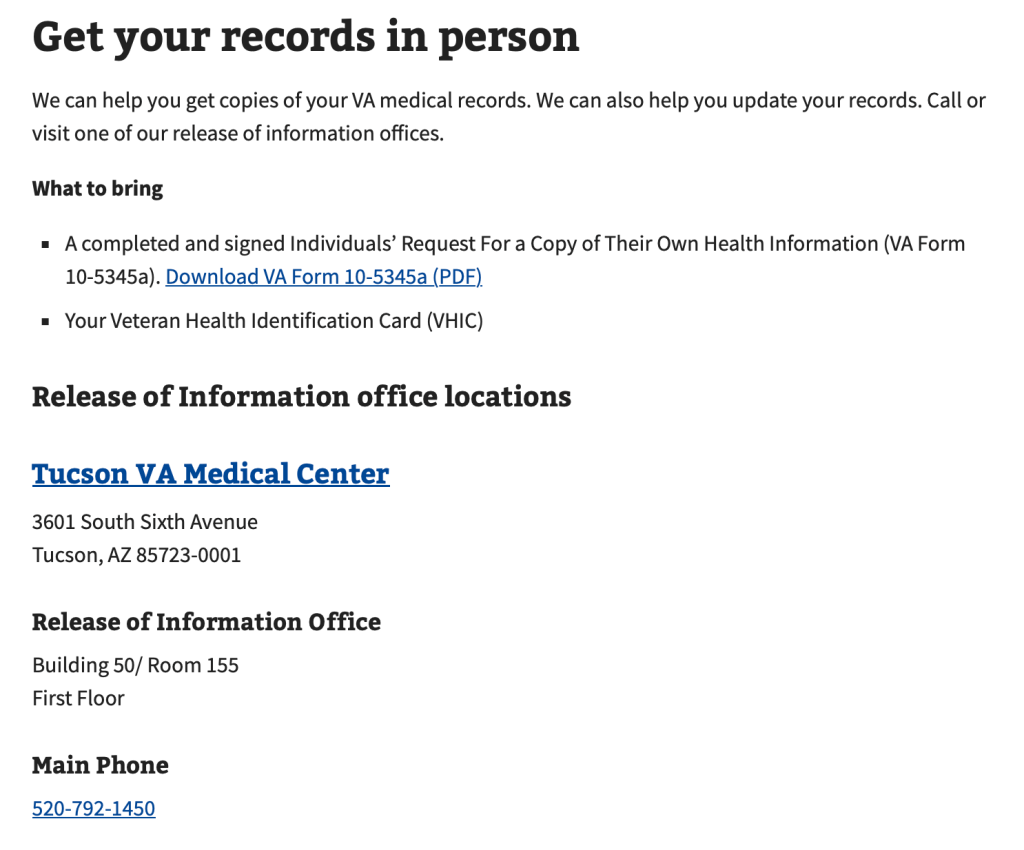
In spring 2022 our team launched a new feature within the content management system: a set of forms for managing “top task” content. Previously, information like the address, phone number and operating hours for a particular medical office was all lumped together in one rich text field. That made the info prone to data entry errors and inconsistent formatting.
I designed new forms that used structured content, where each type of data has its own field. Not only would this improve the accuracy and consistency of information, it would also allow the information to be reused in multiple places. When a phone number changes, for example, the editor can adjust one field and the correct information will be replicated across the whole site.

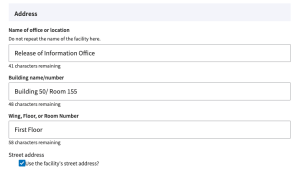
Launching this feature was no simple task, though. It would require the busy editors for all 140 VA Medical centers to manually move facility information out of the rich text fields and into the new forms. How could we get hundreds of site editors to adopt the new forms in a timely manner?
Challenges
As a service designer, I saw three challenges for the feature launch.
- Trust: We were working with a new department within the VA, who had recently taken charge of communications with site editors. Lack of clarity about roles and responsibilities could jeopardize our fledgling relationship.
- Silos: The engineering and communications teams were planning their work separately. But the process for launching the new forms was complex and required seamless coordination. The risk of missing a step, or doing things in the wrong order, was high.
- User experience: At the start, everyone was focused on what our team needed to do — not on what the site editors needed. How would this task be perceived by the people doing the work? I knew that ultimately, the site editors were the ones responsible for making this content change happen — or not.
My approach
To address these challenges, I created a service blueprint in Mural. It became the heart of the team’s planning efforts for this complex feature launch.
How to read the blueprint:
- The very top row outlines the phases of the process.
- The row of white boxes across the top are the actions the site editor will take. This helps the team focus on the user rather than on our internal staff or processes.
Beneath each action, we detail all of the teams and tools involved in making that step work:
- the top, light blue lane indicates what the editor can see or interact with.
- The middle, medium blue lane is for activities the editor can’t see, like people merging code or creating a training video.
- The bottom, darkest blue swim lane is for things that are under the hood. It includes systems and tools, like Outlook and the Drupal CMS itself. It also includes specific policies and expectations that influence the step.
Let’s look at the specific problems the blueprint helped solve.


Problem 1: Trust
How the blueprint helped
- “Interactions with editor” lane clarified relationships
- Visual markers make mushy areas concrete
For this launch, our team was collaborating with a VA department that had recently taken charge of communications with site editors. We all agreed right away that email was the best channel to inform the site editors about the new feature. But who would write the emails? Who would send them? There were a lot of options on the table and no one wanted to commit. These unclear responsibilities across teams risked damaging trust between the development and communications teams.
Enter the blueprint. Having a visual diagram to look at during these discussions made a squishy, semi-political issue very concrete. I would adjust the diagram on the fly during our meetings. It turns out “Where should I put this arrow?” is an effective way to move the conversation forward.
And because the “interactions with editor” were clearly marked in the diagram, everyone felt confident they understood who was doing what. Our team would set the communications team up for success and let them be the face of the message.
Problem 2: Silos
How the blueprint helped
- Blocker icons and red notes revealed dependencies
- Important decision points stay in view
Our VA partners wanted to host office hours for editors to ask questions about the new process, but they were disinclined to choose a meeting date that was more than a month away. Office hours wouldn’t happen until step 20 on the blueprint.
Because the blueprint also tracked key messages for each communication, I knew that we needed a firm date much earlier, so that we could include it in an email to editors at step 13.
Thanks to the blueprint, we didn’t have to cajole our partners into choosing a date. They could see the problem clearly. As a result, they picked a date for the meeting well in advance, we included it in the step 13 email, and that was that. No last-minute panic necessary.
This is just one example of how mapping a process can reveal submerged dependencies and clarify the way teams’ processes affect each other.

Problem 3: User experience
How the blueprint helped
- Everyone could visualize the sequence
- See technical and comms activity at the same time
By its very structure, a service blueprint helps teams focus on the user experience– it’s emblazoned across the top of the diagram.
On this project, the blueprint also helped us execute user research in advance of the launch, tomake sure that the new features would make sense to site editors. Figuring out the order of operations here was tricky: activating the new code in the wrong order would automatically build new pages for 140 Medical Center sites.
The blueprint gave us a way to coordinate the technical and communications pieces of the beta testing puzzle. We actively rearranged the blueprint during our discussions. Playing around in this way helped us see that we needed to manually build pages for our test editors, which had to happen after editors had agreed to participate.
As a result, we were able to successfully beta test the process with editors, interview them about their experiences, and make improvements based on their feedback.

Results
In the end, the feature launch was uneventful– just the way we like it.
The site editors reported that the communications were clear. They got what they needed, when they needed it, and were able to update their information with a minimum of fuss.
Members of our team reported feeling less stressed and confused throughout the launch planning process because of having the blueprint.
Our new partners appreciated the clarity we brought to the process, and our teams collaborate happily and often.
Perhaps most importantly, our team leaders and VA partners are more attuned to the site editors’ point of view. The service blueprint, with its focus on editors’ actions rather than internal processes, offered a new way to think about our work.
 Suzanne Gray